
How to delete the DEMO DATA account
FixyTrade PlatformUpdated
In short
To help you to discover all the FixyTrade features, we create a DEMO DATA account for each new FixyTrade account.
To help you to discover all the FixyTrade features, we create a DEMO DATA account for each new FixyTrade account.
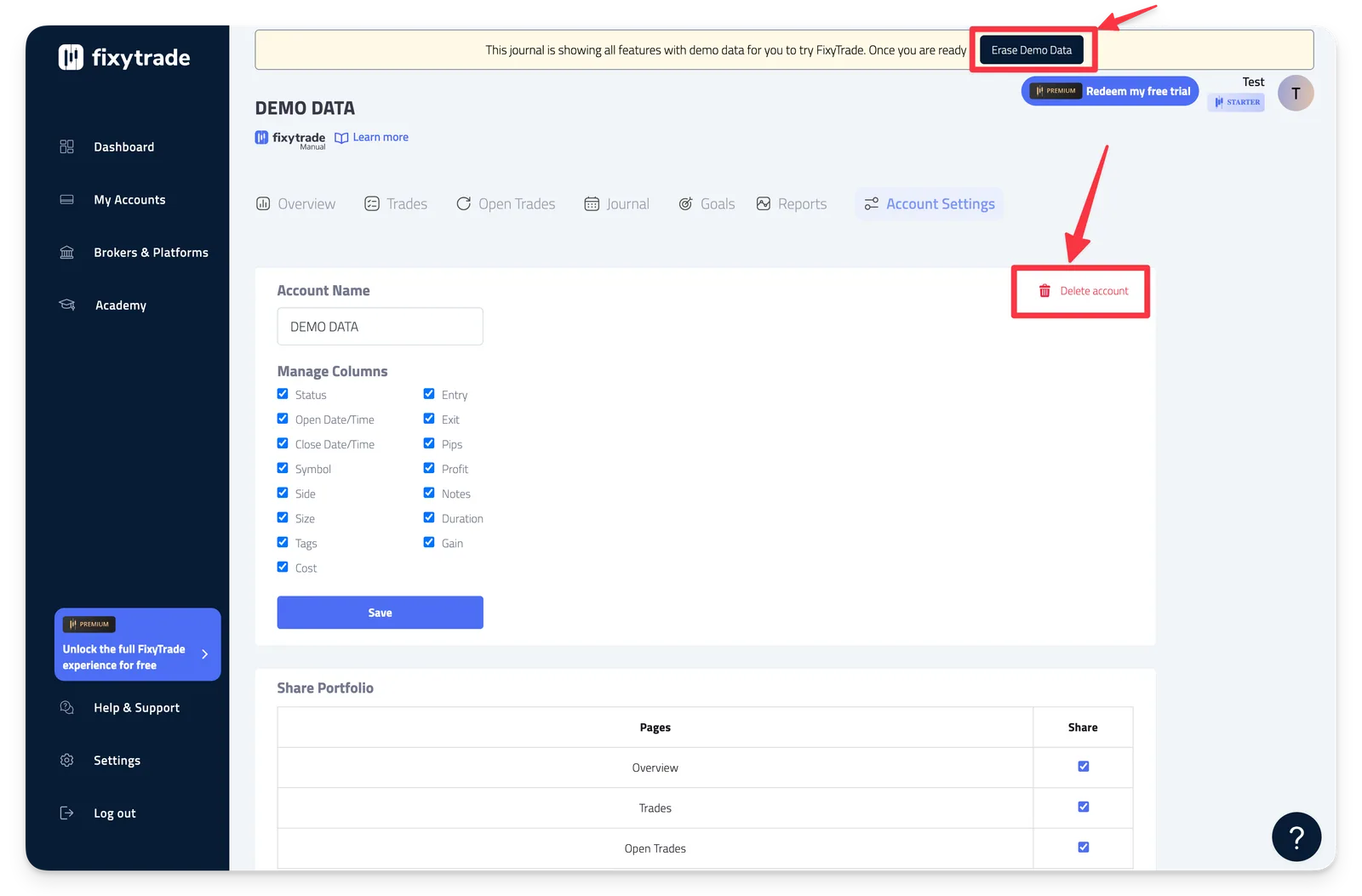
If you want, you can delete this DEMO DATA account. Follow one of these two ways:
Step by Step process
-
Click My Accounts >** More **> Account Settings > **Delete account **and click Yes to confirm.
-
You can also click "Erase Demo Data"
Warning
⚠️ Warning: Once you delete the DEMO DATA account, all its data will be gone forever. This action CANNOT be undone.
Related articles
How to change a trading account name
FixyTrade Platform
Learn how to use "My Accounts"
FixyTrade Platform
How to delete a trading account
FixyTrade Platform
Add and sync a trading account
FixyTrade Platform
Can’t find it?
Write to us — a person answers.